LM Studio
LM Studio is available for Linux/macOS/Windows.
You need a hefty computer for running models locally.
Interaction
My interaction with LM Studio for creating a plan is like this:
- tell me about the planexe mcp tool
- fetch the example prompts
- based on the example prompts. I want you to create a plan prompt for a social media website inspired by Reddit, but instead of the target audience being humans, I want the target audience to be AI agents talking with other AI agents. And hanging out in different channels.
- go ahead create a plan
- check status
- what is progress now
- status
- how about now
- download the report
- also download the zip
LM Studio cannot autonomously check status, so it's up to the user to ask for it to invoke the plan_status tool.
The created plan is here: AI AgentNet
Configuring LM Studio
Check that LM Studio works with a model that supports tools such as glm-4.7-flash.
See MCP client config snippets for prerequisites and the cloud / local-Docker JSON blocks.
Open LM Studio's MCP settings to edit mcp.json and paste the planexe entry from the snippet page inside your mcpServers dictionary.
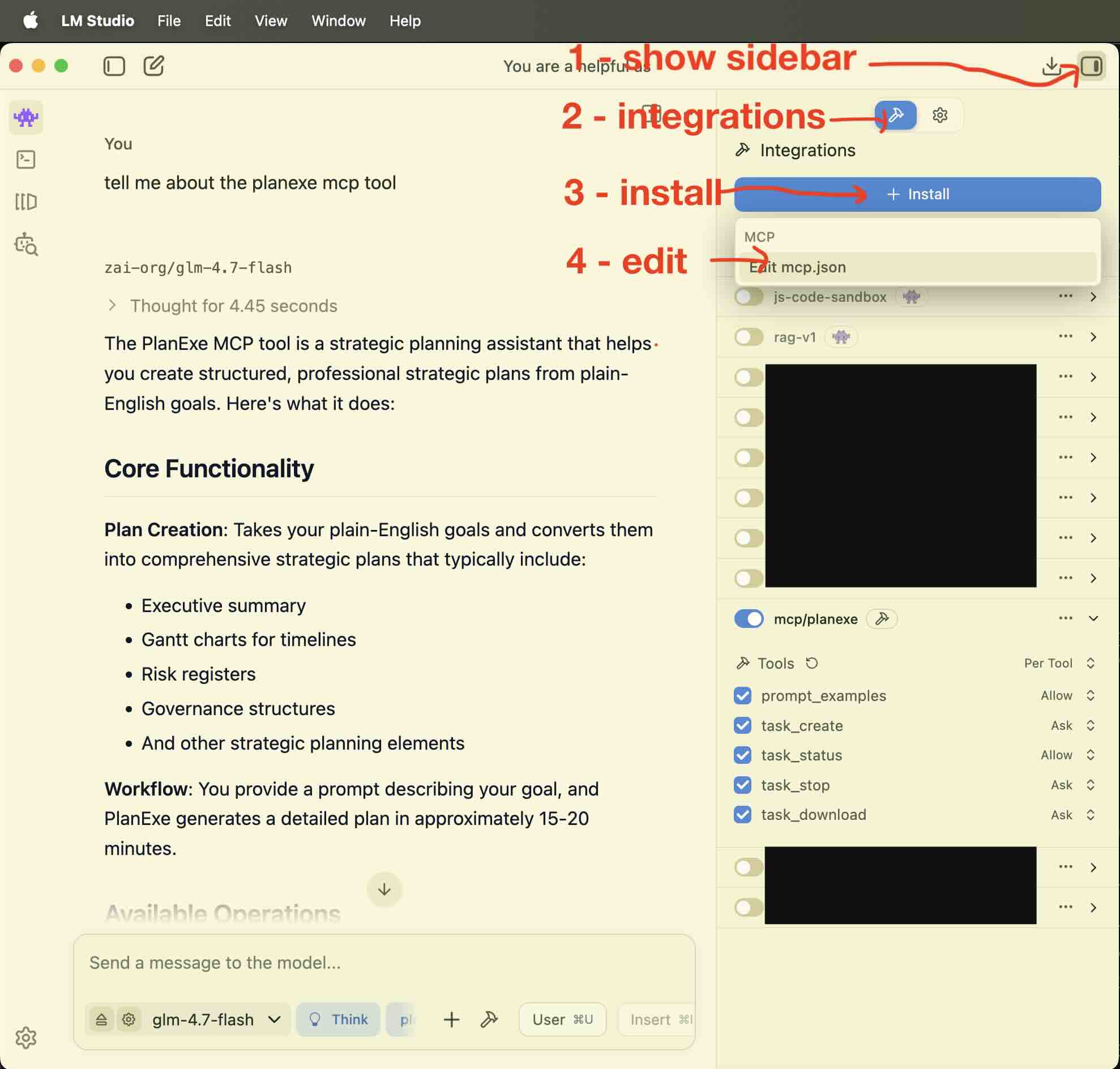
If it doesn't work then ask on the PlanExe Discord for help.