Windsurf
Interaction
My interaction history:
- get planexe example prompts
- I want you to suggest 5 prompts, based on the example prompts
- suggest something that fixes real world problems
- 5 more
- I'm in europe. make 5 suggestions that fixes serious issues in europe
- I like your Heatwave mortality reduction idea. I want you to make a full prompt ala the planexe example prompts, and show me the prompt
- remove the heading "Full PlanExe-style prompt: Heatwave mortality reduction (Europe)". what do you think about the prompt?
- go ahead create this plan
- status
- status Here windsurf went ahead and downloaded the created HTML report
- compare the created plan with the prompt you formulated
- also download the zip
I had to manually ask about check status to get details how the plan creation was going. It's not something that Windsurf can do.
The created plan is here: Heatwave Resilience
Configuring Windsurf
See MCP client config snippets for prerequisites and the cloud / local-Docker JSON blocks.
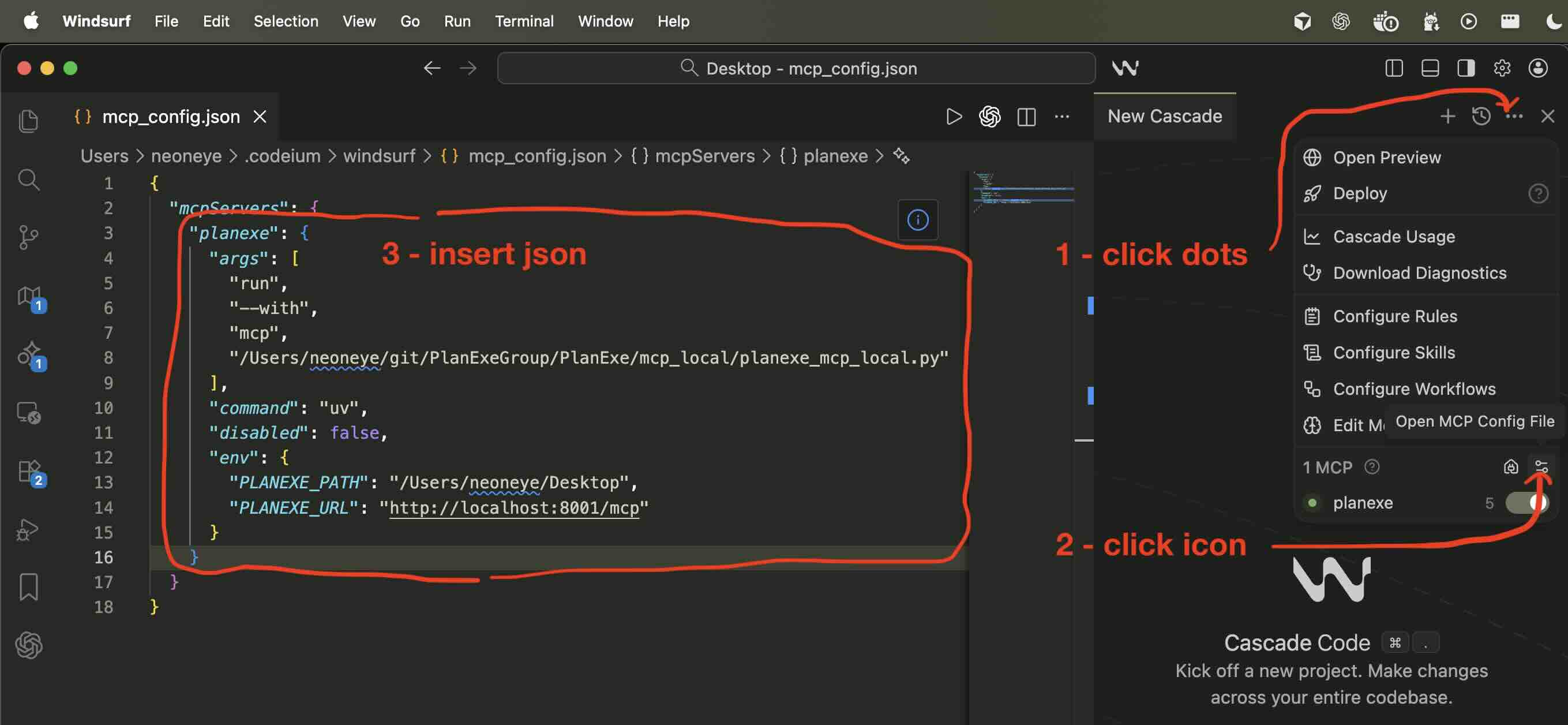
- Open Windsurf
- Click the "..." icon at the top of the Agent panel, this opens a menu.
- Click the "Open MCP Config File" icon at the bottom of the menu.
- This opens the
mcp_config.jsonfile.
Paste the planexe entry from the snippet page inside your mcpServers dictionary.
Once you have saved the mcp_config.json. Then go to the Manage MCP Servers and click the refresh icon.
If it doesn't work then ask on the PlanExe Discord for help.